Standard Operating Procedures
| Author | Peter Konopatzky |
|---|---|
| Contact | O2A Support |
| Technical Contacts | Peter Konopatzky, Andreas Walter |
| Version | - |
This document has a persistant handle which will work even if this document migrates somewhere else:
https://hdl.handle.net/10013/927187e9-9866-4811-bc25-e7ea641d333e.
Use that URL instead of the URL your browser's showing. This document formerly lived on AWI Confluence and has been migrated here with only minor changes.
Summary
This document addresses the procedure of having your data product published in VEF-based viewers such as the Marine Data Viewer ("Viewer"). Goal of these SOP is to provide automated ways of keeping your data product up-to-date – after only having one initial consultation. On SDI side, setting up a new data flow is one-time work, subsequently provided updates/changes will get incorporated automatically.
Either you provide your data (product) directly as an OGC Web Service (OWS) – most probably a Web Mapping Service (WMS) – which can easily be integrated into the Viewer. Or the O2A Spatial Data Infrastructure (SDI) will host an OWS based on your data. For the latter case, the "flow path" through the SOP schema depends on the type of your data, the desired type/structure of OWS and your preferred way of data exchange with the O2A SDI. See the Exchange Protocol section for details.
This document does not provide information on SDI-internal processing/architecture. This is covered here: Technical Infrastructure.
Initial Consultation
Make Contact. Based on a joint assessment of the data situation and the desired outcome we will decide mutually upon an appropriate SOP flow path. The following questions will be discussed.
- From where to where?
- What data should be visualised?
- How should it look like in the Viewer?
- How to realise? Common decisions on
- Exchange protocol
- Viewer integration
Exchange Protocol Choices
via self-hosted OWS
Supported OWS types
- OGC Web Map Service (WMS)
- OGC Web Feature Service (WFS)
via O2A Files
- Supported file types
- data
- (Deprecated) O2A GeoCSV (.sdi.tab + .sdi.meta.json)
- O2A GeoCSV (.sdi.csv)
- O2A GeoTIFF (.sdi.tif)
- vocabulary harmonisation (if applicable)
- O2A Vocabulary Mapping Files (.sdi.mapping.tab)
- data
- Supported exchange location (see Exchange Folder Specification)
- Git repository
- e.g. via Helmholtz GitLab → DataHub
- Isilon project folder
- Git repository
via PANGAEA
- Relevant file types
- O2A specification for PANGAEA sources (.sdi.pangaea.lst) (necessary)
- O2A Vocabulary Mapping Files (.sdi.mapping.tab) (if applicable)
- Supported exchange location (see Exchange Folder Specification)
- Git repository
- e.g. via Helmholtz GitLab → DataHub
- Isilon project folder
- Git repository
Viewer Integration Topics
- Which viewers?
- LayerTree positioning
- Layer styling (e.g. colours, symbology)
- Metadata representation in popups and sidebar
Schema
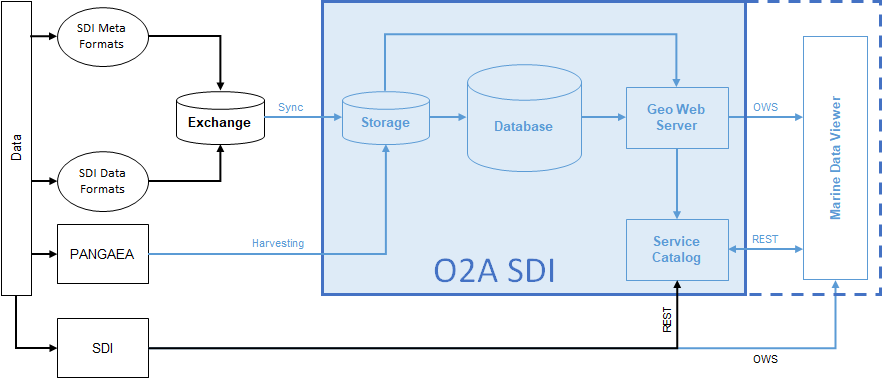
This schema shows possible data flows from your data to the viewer. It is divided into SDI-external elements and SDI-internal elements. The former describe states/processes you will have to take are of after the Initial Consultation, the latter are designed to work fully automated and will be configured by the administrators.